Saturday, December 13, 2014

Dig for Victory - The Fitzroy Comic

Today I had the pleasure of reading the Fitzroy comic. It's a collection of six short stories that takes place in the same world as "The Fitzroy" an upcoming post-apocalyptic movie by Andrew Harmer. I backed the move a long while ago on Kickstarter and have been following the production in the updates since then. While the production has been going on they have had the time to both run a second Kickstarter for the comic and produce it.

I really like the movie tie in, it reminds me a lot of the Matrix Comics that came between the first and second movie which I still think is the best the Matrix has to offer.

Pick up a copy at the Fitzroy Shop I can highly recommend the comic.

Cheers


Gas everywhere.


And a still from the movie

Promotional poster for the movie 

Friday, December 5, 2014

Europa: Ocean World

Amazing Nasa Video about Jupiters Moon Europa.


Which reminds me of one of the best Sci-Fi movie I have seen in a good while.

Europa Report


Friday, April 4, 2014

Trying out, and getting destroyed by Planetary Annihilation

It started with a Kick

Back in September 2012 I backed the extremely successful project Planetary Annihilation on Kickstarter. I
loved and played Total Annihilation back in the day an was very excited by the idea of spiritual successor, as it is called Kickstarting lingo. I have been followed the project since then, I tried out the beta but could not play it on my computer and today I decided to give the gamma a try. As you can guess by the title, I got my as kicked, my robot armies were destroyed, my commander imprisoned and doomed to spend eternity in robot  :) Here is a short write up of my first visit to robot mayhem.

Computer Specs

I think I need a new... everything.
My computer is pretty good for working on, but it is not a gaming computer, I get by for the most time but when it comes to graphic heavy games like  
PA, it's probably not up to the challenge. But it is all I go for the moment so it'll have to do.
Dell Laptop 17" inch wide screen.
Intel Dual Core T9600 @ 2.80 GHz
4,00 GB of Ram
Nvidia Quadro FX 2700M

Commander RoboKeen

Commander RoboKeen.
May your victory be merciless
After starting up the game and signing in, you can enter the armory and pick a commander. There are several different commander classes. Not sure how different they really are or if it is just a visual thing. But they look great and I want to play them all. I picked this guy, a bi-pedal gun tooting maniac commander. I call him, Commander RoboKeen! 


Adventures of Commander RoboKeen: Operation Dirtball

Since I am new to this I picked the simplest ( or so I thought ) system possible. A single deserted planet, no moons, no lakes or mountains. No nothing. Turn out that maybe wasn't the best idea, cause it was really hard. I had to defend the base on all front since you never knew where the attack was going to come from. If you leave on flank unprotected be sure that the will find your weakness and use that to attack your base. 

I will not keep this post long, here is summary of my experiences.

Unlike the Beta, the Gamma was much more gentle on my system and very much playable. And very much enjoyable. But it was harder then a I thought. The interface or what you can do was not as easy and intuitive as I had hoped. Or maybe I just didn't have the chance to explore it since the AI was on me after only a few minutes. Sending his tanks to explore and try out my defenses. 

I tried to keep up a good pace of expansion and building troops, and defenses. But after only 20 minutes the AI's troops had me outnumbered and shortly after my base and commander were destroyed. 


Picking a starting point on the North Pole not only gives the AI an opportunity to attack you from all sides.
It also gives you a huge N in the way when playing.  
Here they come!
Commander AI did not wait long before sending his troops to my base.

And not long before my beautiful base was crumbling metal and dust. 

Zooming out it you can see how Commander AI's forces (brown) unnumbered mine.
My orange forces are by this stage mostly walls. 

Post game review

Commander AI, I bow to you.
 After the match the game gives you the option to review the match using a feature called chronomcam. It gives you an opportunity to pretend you are a Chess Grandmaster and analyse your match and learn from your mistakes.

Since I never got close to the AI base I never go to so see his commander. The review game me a close up of him. Look at that guy, how did I ever think I would stand a chance. If I had a chance to see him before the game I would have admitted defeat and happily joined his robot ranks as a Lieutenant Colonel or at the very least a Staff Sergeant. Perhaps he would let me oil his joints or polish his displays.  

I think that my biggest mistake, expect not knowing what the hell I was doing was to stop expanding, or at least not expanding fast enough. After 3 minutes our resources stats looked about the same. But 15 minutes into the game they looked something like this. Commander AI had more then 10 times as much metal extraction as me and about 8 times as much energy production going on. With those kind of numbers I would not stand a chance, even if I did know my left bot from a vehicle factory.

Verdict

I am happy and surprised that PA was playable on my machine. I really enjoyed it even if I got my but kicked. I will definitely give it many more chances and try to become a good player. Even if I never will be good enough to play online I still hope to be able to give the AI a bash or too. Or play in a co-op with some friend against the AI.

I hope to watch some games online, explore if there are easier AI settings to begin with. Learn the UI better and how to set up automation of defense, repair and production so I do not have to do so much micromanagement. And get a build order so I know better how to get started.

Thank you for reading, may be best Robot Overlord win!


Sunday, March 30, 2014

Trying out digital boardgaming on the VASSAL Engine

After reading about Vassal a game engine for building and playing online adaptations of board games and card games on your computer on RPS, me and my friend Nils, who literally lives on the other side of the planet making it hard to play board games together,  decided to give it a go. Here is our first impressions with the software.  

Modules

Each game you can play is represented by a module, and there is literally hundreds of modules, and hence games you can play. But there is an honor system in place you should not download and play a module/game unless you own the game. And since the rules does not seem to be available in the module it is really hard to start playing something.

Carcassonne

We wanted to start with something we both knew so we decided on Carcassonne, a board game classic. We downloaded  and installed the engine and then we downloaded and opened the module.
http://www.vassalengine.org/wiki/Module:Carcassonne

Getting started

It was a bit tricky to get started, but after we figured out how to log in, create a game and start a game we were rolling. Slowly, slowly rolling, not sure where. It took us a while to figure out that the tiles were updated and synchronized between us, but the meeples were not. So Nils placed a tile with a city and placed a mayor in the city, after clicking Finish I could see his tile, but Nils had to tell me that he placed a mayor there and I had to place one there myself also, one of his. And the reverse when I placed a meeple on the board, I had to tell Nils and he had to move a meeple of mine to his board. Confusing at first and very much configuration needed. But after a while it actually worked really well and we got pretty far into the game. 


Fun but deceitful 

But it was tricky, since usually when you are playing digital version of games you are used to that the game tells you when you have an illegal move, but since the rules are not implemented in the modules, only the board layout and tiles, you can do incorrect moves and get away with it. 

After about 30 moves each we had good speed in the game and it worked really well. But we realized that we had a bit different view of the rules, as I had mostly been playing the Android version and Nils the board game version. And also I had been doing a couple of illegal placements, as you can see in the screenshots. And we forgot to start with the center tile. So we decided to call it a draw, read up on the rules and points and try again another night.  

But I'd still call it a success, we had great fun and will definitely do it for real next time, may the best meeple commander win!


Game play Images

It looked like a lot of the expansions also were available. 


Trying another module, Small World Underground

Small World and Small World Underground are games that we have placed a couple of times and really enjoyed so we thought we would give it a try, but the amount of tokens, races, expansions got us off to a confused start. We didn't really got to play anything, we spent a quarter of an hour trying to figure out how it worked, and the we realized that we didn't know the rules well enough. But I absolutely think we can make it work and have fun playing it. 


And Another, Citadels

Citadels is a game I have a played a lot so I check it out. All the cards where in there so it looked pretty nice. But as the other it took a while to get orientated.

Summary

VASSAL looks great and I think that Nils and I will pick it up again soon and place a couple of game. I think it'll be good to make sure that the first session of a new game, or at least the first 30 - 60 minutes are set aside to learn  how that particular modules is played. 

Focus on game that we already know well and have played several times in real life will things much easier. And make sure to have the rules close by since do not come with the module.


Virtual Reality and Oculus Rift

Just wanted to post a quick one about how excited I am about the future of Virtual Reality and the Oculus Rift.

I know that many are skeptical about Facebook's purchase of OC and I was at first too. But after reading these two very interesting articles about the purchase and the future of VR I have to say that I am super excited what Facebook's money is going to do for Virtual Reality.

I will be following this closely from now on.

Articles

http://www.forbes.com/sites/insertcoin/2014/03/28/ready-player-one-author-ernest-cline-believes-in-facebooks-oculus/

http://www.oculusvr.com/blog/introducing-michael-abrash-oculus-chief-scientist/


Books about Virtual Reality ( that I haven't read but would love to )

http://www.goodreads.com/book/show/9969571-ready-player-one

http://www.goodreads.com/book/show/830.Snow_Crash

The future is now soon!

Saturday, March 22, 2014

Cryptocurrency and Dogecoins for the win

I started out the day with trying to learn more about bitcoin and see how I could get into the whole mining business, I live in Australia after all. But after reading a bit it seemed that I missed the train, it was cumbersome to set up and the instability of the currency makes me think that I'll hold of investing my super into bitcoins right now. 

But I wanted to know more about cryptocurrencies so I kept reading and I am amazed that there are so many currencies out there. coinmarketcap.com tracks almost 200 different currencies.

There are many of them and it can be hard to get started, but I feel for Dogecoin since I could get started straight away, it has a Aussie connection and pictures of cute dogs.

Dogecoin

Dogecoin seems to be the most ridiculous but also one of the fastest growing of the currencies. The rise to power seems to be the low entry level, it takes less than a minute to set up a digital wallet and get started. I am using dogevault for a wallet https://www.dogevault.com
And there are plenty of places called faucets where you can get your first DOGE for free for that feel good feeling. 
Checkout http://freedogecoins.net/ for a free DOGE resources. 

Read more here:


Tuesday, January 7, 2014

Software Testing rebooted and reimagined

For the last 4 years I have been doing purely Test Automation and my interest in Software Testing as a career and my involvement in the community dwindled to basically a halt.

But now I find myself as a QA Engineer at Atlassian in Sydney, Australia. Trust me, I am as surprised as you are!

So I have decided to pick up my commitment for my Testing career again and I start reading and studying more blogs and articles again.

I have started by reading this excellent article by James Bach.
http://www.satisfice.com/articles/omega_tester.pdf

Enjoy and see you soon

Friday, April 5, 2013

WhatTheFrak: Test Indicator in TestComplete breaks my Test Cases!

I am currently working on an assignment where we use TestComplete to run their automated web test cases.

I found something that made me go "What The Frak" last week that I would love to share.

Running the tests locally I was getting the ever so annoying sometimes-it-fail-sometimes-it-just-works behavior on a few test cases. The same scenario every time. Test ran as expected up until a point where it's suppose to click a button, after the click is made the new page is not loaded.

I was looking in the logs and it look like everything was ok. It would locate the correct object to click. Calculate the correct x and y co-ordinates. Move the mouse to the correct position. Fire a click. Looking at the screen shoot that is taken it looks like TestComplete was clicking exactly where it was suppose to click. But still the new page wouldn't load.

I enter the system manually to click the button in different scenarios only half expecting it randomly not to work. But the button worked perfectly every time.

I then realized that it only happened on a few select buttons all located in the upper right corner. So I ran through the tests that sometimes would fail watching the upper right corner like a hawk. And that's when I noticed that the TestComplete Indicator has a pop up text box displaying log information, the pop up changes size depending how much text is in it. We had made some changes to logging and sometime it would get pretty large. Maybe 3 times the width of the Indicator itself.

When I watched it carefully I saw that sometimes the popup text would get big enough to cover some of the buttons in the system that we use in the text.

Not believing it could actually be true I did some tests. After starting a test I immediately paused it.
Then placed a windows with a button half way under the pop up. When I tried to click through the pop up nothing happened. Trying to clicking outside the pop up, of course, worked perfectly.

So what happened to the test where that the Indicator pop up blocked the button and my tests clicked the pop up instead! Which, naturally, didn't load the expected page.
*Sigh*
I know you don't believe me so I added two example pictures below.

Image 1: Hovering over the blocked part of the settings button gives no indication that I have the mouse over it. Clicking does nothing.

Image 2: Hovering over the unblocked part of settings button gives an indication that has a mouse over it. This is happening even if the window is not active. Clicking it opens the menu.


I still have a hard time believing how SmartBear could do this. It feels like such an obvious mistake.

Solution

The solution was to hide the indicator before we clicked and showing it after clicking has been done.
Indicator.hide();
// Do the clicking
Indicator.show();

When we run the tests in our continuous integration environment we hide it permanently. Just to make sure it does not mess with any of our tests in some way.

Now all the tests run smoothly and all clicks go through as expected!
And there was much rejoicing.


Friday, October 26, 2012

Getting Started with node.js on Ubuntu

This is a small getting started guide for getting up and running with node.js on Ubunutu.

Step 0: DON'T install node.js from Ubuntu Software Center.
When I started messing about with node.js the first thing I did was to install node.js from Ubuntu Software Center. But soon I started using it I realised that some of the stuff that my friends where using, like npm ( more on that later ) was missing. I check the version and realised that the version I got from UBC was 0.2.6 while the latest verision was 0.8.12. So i quickly removed it from UBC and headed online.

Step 1: Install from nodejs.org  
Head to http://nodejs.org
Clicking the "Install" link will give you the latest version tar.gz
Extract the content to somewhere good, this example i will use ~/code/
Enter your terminal and go to the folder, cd ~/code/node-v0.8.12
Read through README.md carefully ( lol! )
>./configure
stuff happen
>make
more stuff happen
>sudo make install

Restart your terminal


Step 2: Start Server
Copy the following code to a file called node_js_getting_started.js
var http = require('http');
http.createServer(function (req, res) {
  res.writeHead(200, {'Content-Type': 'text/plain'});
  res.end('Running node.js\n');
}).listen(1234, '127.0.0.1');
console.log('Server running at http://127.0.0.1:1234/');
Or download the file here node_js_getting_started.js

Now run the command >node node_js_getting_started.js
And you should see
Server running at http://127.0.0.1:1234/

Step 3: Test it
Open a browser and go to http://127.0.0.1:1234/
and now you should see "Running node.js" in your browser.
We got a webserver with node.js up and running! Yay!


Friday, September 28, 2012

Shellshocked! - Powershell basics

This is a basic FAQ, reference table, cheat sheet, dummies guide, whatever you want to call it for Microsoft Powershell.


I started using Powershell regularly recently at my current assignment at a company that does Business Intelligence and only use Windows based systems.  I decided to document my recently acquired knowledge for my own good and I thought that maybe it'll be help to someone else out there. This is by no means a complete reference to Powershell, it's just a collection of the stuff I use the most. And I'll be adding more and more to it as time progresses.
If you spot any errors or can suggest improvements please let me know.

Running Scripts

You might get an error the first time you try to run a powershell script on a new computer, the error you get will look something like this.
File C:\scripts\test.ps1 cannot be loaded because the execution of scripts is disabled on this system. Please see "get-help about_signing" for more details.
To fix this you need to open Powershell in Administrator mode and run
Set-ExecutionPolicy RemoteSigned
Now it should be possible to run your scripts.

Commands

Create Directory
Let's say we want to create a folder called "Appname" in our Apps folder.
new-item C:\ProgramData\Corp\Apps\Appname -itemtype directory

Wait for input
If you want user input you can use Read-Host
$a = Read-Host "Press enter to End"

Write to Screen
Write-Host "Hello World"

Download file from Internet
Want to download something from the web? No problem. Create a Webclient object and use DownloadFile.
$webclient = New-Object System.Net.WebClient
$url = "https://blogger.googleusercontent.com/img/b/R29vZ2xl/AVvXsEhspnpZGK25blu0_PtvwrljVqhr7cMKHk30jlTLniStMgmlhIjx5UmnIsU93QBrX0kXXa2xFNlZds9NVM3TnPmxn7BSj0QctDlwKrz3ziAEmMMzQGu1qgc1FfroTDuwlpAwBb17D_HjdqY/s220/jonas_bw.jpg"
$file = "good_looking_guy.jpg"
$webclient.DownloadFile($url,$file)
>> WebClient at MSDN

Fun Trivia 

When writing this Google's Chrome gave me a typo warning for "Powershell" and suggested "Powers-hell". Coincidence? :)

Friday, April 13, 2012

Running SQL commands on Sybase from Hudson

This post means to describe the several problems i found when trying to run SQL commands on Sybase from Hudson.

Problem 1: Host key verification failed”
Problem: When trying to SSH to the server which holds the Sybase database I got "Host key verification failed" even thought they keys were correct.
Solution: The missing piece of the puzzle was a row in the ~/.ssh/known_hosts file.
By using another user, which uses the same private/public key, I could run a ssh to the sybase server and get a row in that users known_hosts file. Then I just copied that row to
/var/lib/hudson/.ssh/known_hosts and voila everything worked.
Learn more:
http://amath.colorado.edu/computing/unix/sshknownhosts.html

Problem 2: Shell profile not loaded when running one-line ssh
Problem: The script we need to run on the server needed a lot of magic that was set up by the shell profile scripts. When ssh:ing to the server the profiles scripts are run and everything is dandy. But from Jenkins I need to use one-line ssh commands like this.
ssh user@server "isql < lots_of_stuff.sql" But when running one-line ssh the profile is NOT loaded and and I get a lot of errors since the magic is not set up. Solution: Load the profile in the ssh one-liner before running the real command. ssh user@server ". ./.profile; isql < lots_of_stuff.sql"

Problem 3: Incorrect Locale
After solving the two problems above I was sure everything would work fine, but no, of course it didn't.
Instead of the expected SQL response I got:
The context allocation routine failed when it tried to load localization files!!
One or more following problems may caused the failure

Your sybase home directory is /opt/sybase. Check the environment variable SYBASE if it is not the one you want!
Using locale name "POSIX" defined in environment variable LC_ALL
An error occurred when attempting to allocate localization-related structures.
Locale name "POSIX" doesn't exist in your /opt/sybase/locales/locales.dat file

POSIX? It could make a grown man cry :~(
Solution: Adding -v, for verbose, to the ssh command I could quickly see the difference between what Hudson was doing and what happened when running it from my own machine.
Hudson:
...
debug1: Sending environment.
debug1: Sending env LC_ALL = POSIX
debug1: Sending command: . ./.profile; isql < lots_of_stuff.sql


Locally:
...
debug1: Sending environment.
debug1: Sending env LANG = en_US.UTF-8
debug1: Sending command: . ./.profile; isql < lots_of_stuff.sql

No locale is sent from my local machine so I tried overriding it before sending the command in Hudson and it worked.
export LC_ALL=;
ssh sybase@inttestsbn.its.sec.intra '. ./.profile;isql < lots_of_stuff.sql'

And it works!

Thursday, January 12, 2012

Ultimate Password Solution using Dropbox and KeePassX

Today I found the ultimate password management solution using Dropbox and KeePassX.

I wanted a secure enough solution that can be used and managed on multiple computers. My old solution was a .txt file in Dropbox with a name that hopefully nobody would look in. But today I migrated the solution to KeePassX using a encrypted database saved as a file in Dropbox.

Another problem I had was that I couldn't download my entire Dropbox account to work since it takes to much space. But nowadays Dropbox for Linux can handle Selective Sync, i.e. only check out selected folders and not everything.

Here is how you can get the same set up step by step.
Written assuming you have a Dropbox account and the folder where you want to keep the password file is already created.

Step 1: Install Dropbox
https://www.dropbox.com/install

Step 2: Check out the folder where you want to save the password database
https://www.dropbox.com/help/175

Step 3: Install KeePassX
Use synaptic package manager or link below.
http://keepass.info/download.html

Step 4: Create new database in KeePassX
Generate new file and save it in your Dropbox folder
Add secure password ( http://www.generate-password.com/ )

Step 5: Add your entries to KeePassX

Step 6: Repeat step 1 - 3 on all your computers.
Instead of creating a new database connect to the file you created in your Dropbox folder.

That's It and now you are in password management heaven!

Enjoy!

Wednesday, December 28, 2011

Classes and Test Jars and Poms Oh My. Building a TestCoverage Test takes them all.

After spending a few days on getting a complicated coverage test working I really feel I should document it.

My setup is that I have 3 maven projects. One parent project and two subprojects, one for functional testing and one for coverage tests. The crux I had with this assignment was that the coverage project needed to be able to read classes and their annotations from it's sister project "xml-functional" to determine what it actually tested.

Overview of the maven project set up

/xmltest
   /xmltest-functional
   /xmltest-coverage


Description
xmltest : This is the parent project, it does nothing in it self.
xmltest-functional : The functional tests
xmltest-coverage : The coverage test what I was building

Creating a Test Jar
First step was to get this working was to set up my xmltest-functional project so it would create a test-jar with all the test classes. For this I used maven-jar-plugin to add a new execution.

In /xmltest/xmltest-functional/pom.xml

<project>
...
  <build>
    <plugins>
    ...
      <plugin>
        <groupId>org.apache.maven.plugins</groupId>
        <artifactId>maven-jar-plugin</artifactId>
        <version>2.2</version>
        <executions>
          <execution>
            <goals>
              <goal>test-jar</goal>
            </goals>
          </execution>
        </executions>
      </plugin> 
      ...


Did it work?
Now, after running mvn clean install, there is a tests.jar created which contain all the test classes in our functional project.

~/.m2/repository/com/companyx/xmltest/xmltest-functional/2.0.0-SNAPSHOT$ ls -l
xmltest-functional-2.0.0-SNAPSHOT.jar
xmltest-functional-2.0.0-SNAPSHOT.pom
xmltest-functional-2.0.0-SNAPSHOT-tests.jar


So?
And now I can use that jar in our coverage project. First we need to add a dependency to the functional project in our pom. We want to use the "tests.jar" so we set classifier and scope to tests and test.

In /xmltest/xmltest-coverage/pom.xml

...
    <dependency>
      <groupId>com.companyx.xmltest</groupId>
      <artifactId>xmltest-functional</artifactId>
      <version>2.0.0-SNAPSHOT</version>
      <classifier>tests</classifier>
      <scope>test</scope>
    </dependency>


Adding the normal dependency
But that is not all, we also need to add the normal dependency so that when in create class objects of what we find we don't get errors.

In /xmltest/xmltest-coverage/pom.xml

...
    <dependency>
      <groupId>com.companyx.xmltest</groupId>
      <artifactId>xmltest-functional</artifactId>
      <version>2.0.0-SNAPSHOT</version>
    </dependency>


Writing the Test
Now, what we need to do is to write the coverage test.

A typical test class

package com.companyx.xmltest.functional;

...

@Path("/image/{id}")
@Test
public class ImageControllerGetTest {


Coverage Test
Now, finally, I can write a test which scans in the classpath for classes with are annotated with @Test, loops through all that have the correct package, checks if they have the @Path annotation and get the annotation.


ClassPathScanningCandidateComponentProvider scanner = new ClassPathScanningCandidateComponentProvider(false);
scanner.addIncludeFilter(new AnnotationTypeFilter(Test.class));
      
for (BeanDefinition bd : scanner.findCandidateComponents("com.companyx.xmltest.functional")) {
   
try {
   Class clazz = Class.forName(bd.getBeanClassName());
   if( hasPathAnnotation(clazz) ){
      Annotation annotation = clazz.getAnnotation(Path.class);


And so on and so forth
And you'll just have to imaging that we do the same for the controller classes, puts it all into two lists and compare the lists. But I'm sure you can figure out how to do this :)

Why don't you just filter on Path.class instead of Test.class
I am sure someone would ask this if I actually had any readers.
Good question and the reason we do this is because we want to find test classes which has missed being annotated with @Test. It happens and we want to catch those cases as well.

That's It
I hope you got something out of this, I sure learnt a lot while writing it.
Hope to see you again in the next blog post.

And remeber:

"To error is human, to test is divine"


Maven Ninja Moves

I'll round off with some good commands my Mentor taught me.

mvn versions:display-plugin-updates
Gives you a list of plugs you can update.

mvn versions:display-dependency-updates
Gives you a list of dependencies you can update.

Monday, November 28, 2011

Recovering deleted files from an svn repository

Hi

This posts show how to recover a deleted file in Subversion.
Assuming the file is called "VeryImportantFile.java" and it was deleted by mistake by the sloppy developer John Doe.

1. Get svn log
Assuming the file is to big to work with in the terminal we save the output
>svn log --verbose > svn_log_verbose

2. Open file in text editor
>gedit svn_log_verbose

3. Find the commit that delete it
Ctrl+F "VeryImportantFile.java"

Fixed stuff in the system
------------------------------------------------------------------------
r53308 | john_doe | 2011-11-17 13:15:39 +0100 (Thu, 17 Nov 2011) | 1 line
Changed paths:
M /trunk/xmlapi-test/src/test/java/com/RegularFile.java
A /trunk/xmlapi-test/src/test/java/com/NewFreshFile.java
D /trunk/xmlapi-test/src/test/java/com/VeryImportantFile.java

4. Revert it
You need to use one revision BELOW the one that deleted it.
> svn up -r 53307 src/test/java/com/VeryImportatFile.java
A src/test/java/com/VeryImportantFile.java
Updated to revision 53307.

5. Add to repo
> svn cp -r 53307 src/test/java/com/VeryImportantFile.java svn://svn.project.com/java/trunk/xmlapi-test/src/test/java/com/VeryImportantFile.java
Now you are promted default text editor to enter commit message. Enter message, save file and Exit to commit.
( cp is short for copy )

6. Update Repo
> svn up
U src/test/java/com/VeryImportantFile.java
Updated to revision 53790.

Now the file is reverted and back in repo! Life could not be better!

Saturday, October 8, 2011

Ubuntu 11.04 Freeze On Startup using Current Nvidia Drivers

Yesterday coming home from a night of dining and board games I decided to update my Nvidia drivers. The reason I wanted to do this was because I just bought the Humble Frozen Synapse bundle and it was running slow on my machine, I thought that updating the Drivers would give me some sweet Hardware acceleration and kung fu graphics.

But instead of Gaming Heaven I entered Linux Hell.

After selecting "NVIDIA accelerated graphics driver (version current) Recommended" and rebooting I couldn't use my computer any more. Ubuntu and Unity would start. I was able to move the mouse but rest of the desktop was frozen. It was like it had frozen in mid launching.

I figured that changing back to the old driver would fix it. Likely by entering some kind of Graphics Safe Mode. But how to do this without a GUI was a not obvious to me.

This is the long version of how I fixed it. I have included some, but not all, of my trial and error. I am writing this both for my sake, otherwise I am likely to forget how it was fixed, and for your sake, hoping to help someone with similar problems.

Part 1: Grub
Since I only have one OS on my computer Grub was configured to not show a menu on start up. So first I needed to figure out how to enter Grub on boot. Holding down SHIFT like it said in the documentation didn't work so I after I while I figured out that if I pressed "Ctrl+Alt+Del" and held for a few seconds it would reboot and Grub menu would show up. Doing this all the time was annoying so I decided to enable Grub on boot.

Step by Step instructions:
* Reboot and hold "Ctrl+Alt+Del" to enter Grub.
* Select Recovery mode of latest kernel
* Select "Drop To Root Shell Prompt"
(Root shell did not ask for password which was kind of scary)
* Edit file /etc/default/grub

I changed "GRUB_HIDDEN_TIMEOUT=0" to "GRUB_HIDDEN_TIMEOUT="
This, according to Grub Documentation, means
- The menu will be displayed for the number of seconds designated by GRUB_TIMEOUT.

I changed "GRUB_HIDDEN_TIMEOUT_QUIET=true" to "GRUB_HIDDEN_TIMEOUT_QUIET=false"
This, according to Grub Documentation, means
- A counter will display on a blank screen for the duration of the GRUB_HIDDEN_TIMEOUT value.

* Restarting Computer
Now Grub menu is shown by default. Yay!

Part 2: Disable auto-login
Since I'm the only user on the system Ubuntu has been set up to Auto-Login with my User. I needed to turn this off since I figured I could select Safe Mode from login screen. I couldn't enter the system since it freezes so I needed to do this from the command prompt.

Step by Step instructions:
* Reboot to enter Grub.
* Select Recovery mode of latest kernel
* Select "Drop To Root Shell Prompt"
* Edit file /etc/gdm/custom.conf

I changed "AutomaticLoginEnable=false" to "AutomaticLoginEnable=true"

* Restart Computer, select latest Linux in Grub
Now I have a login screen instead of a Unity that hangs. Yay!

Part 3: Login Safe Mode
When login screen appears I stopped the timed login and selected my user.
At the bottom of the screen there is bar where you can choose window manager.
I selected "Ubuntu Classic" which means Gnome, and enter Ubuntu.
Won't Start! Same as in Unity, freezes Desktop but I can move the mouse. Damn!

* Restart and try again
This time I select "Ubuntu Safe Mode" and enter Ubuntu.
It starts and I can use my computer again!
I'm so close to victory that I can taste it.

Part 4: Disable nvidia-current
* From Gnome menu I select "System" -> "Administration" -> "Additional Drivers" and try to enable the old Nvidia drivers but is informed that I do not have permissions to do such a thing.
* Using "System" -> "Preferences" -> "Main Menu" I find out the command to start "Additional Drivers" which is "/usr/bin/jockey-gtk".
* Start terminal and enter "sudo /usr/bin/jockey-gtk"
* Dialogue opens and I can enable the old Nvidia drivers.
* Restart Computer and Select "Ubuntu" on login screen.
Now Unity starts without freezing!

After a few hours of fighting with Linux I am finally back to where I started.
Frozen Synapse still has bad FPS and lagging but I so much better than a Computer that freezes.

Have a great weekend!

Sunday, August 7, 2011

VVVVV on Ubuntu 11.04

Today I bought The Humble Indie Bundle #3
It's a collection of Indie games and it's pay-what-you-want. They clamied that "All games in the Humble Indie Bundle work natively on Linux." and I am interested to see if they really do. I have heard of most of the games and was very keen on trying out VVVVV which seems really cool.
It's only 2 days left on the package so hurry if you want to try it out.
The sale of the bundle is over :(
http://www.humblebundle.com/

After paying $10 I got a link where I could download the games. After downloading and unzipping VVVVV I entered the terminal and tried to run it.
>sh VVVVV

But got an error
./VVVVVV_32: error while loading shared libraries: libSDL_mixer-1.2.so.0: cannot open shared object file: No such file or directory

A litle googleing told me that the SDL_mixer library is missing.
Let's install it.
>sudo apt-get install libsdl-mixer1.2

And it works!


I'll try the other games and write more about it later.

Now I am going to enjoy the game.

Have fun!

UPDATE:

Mini Review!
VVVVV is a fantastic game, it's loads of fun and extremly challenging. I died almost a thousand times in the 2½ hours it took me to complete the game. But it was worth every death. It's innovative and groundbraking.
VVVVV is like Meteroid on LSD!

Final Stats.

I still have some "trinktes" left to collect. They are optional but adds extra value to the game. I'm sure that collecting the last 6 take me as long time as to finish the regular game.

If you get chance to try VVVVV you should, it's a great game.
http://thelettervsixtim.es/

Have fun!

Progress on Player Levels

Player Levels I have finished so far:
* Line Warp ( fun and challanging )
* Roadtrip to the moon ( fun but short )
* Pyramid Of Doom ( great but to short )
* Variation Venture ( best so far! )


Friday, July 1, 2011

The true beauty of QTP

Ian Fraser has well said it -

“The true beauty of QTP is that the only limitation is your imagination and ability to code in VBScript.”

Saturday, January 8, 2011

Getting Amiga 500 game Demon's Winter running on Ubuntu

This is a step by step instruction on how to get the Amiga 500 game Demon's Winter running on Ubuntu 10.10.

It's highly probable that these instructions will get most Amiga games running on most versions of Ubuntu/Linux. At the very least it'll give you an understanding of the steps to take to get emulating Amiga to work.

Step 0: What is Demon's Winter?
Demon's Winter is a role-playing game released in 1988 for the Amiga by Moby Games. A friend told me about it so I decided to try and get it up and running on my Linux Desktop. If you want to know more check out the following pages
http://en.wikipedia.org/wiki/Demon's_Winter
http://www99.epinions.com/game-review-F1F-5744459-3A290AB3-prod1

Step 1: Download Demon's Winter rom
Amiga roms are called .adf ( Amiga Disk File ) and you need it to play the game naturally.
Download zipped Demon's Winter rom from link belown and unzip it somewhere.
http://www.emuparadise.org/Amiga_ROMs/Demon's_Winter/5958

Step 2: Download Amiga Kickstart Rom 1.3
To start the game you need to emulate the Amiga OS, for this you need a Kickstart Rom. In case of the Amiga 500 you need a 1.3 kickstart rom. You can create your own if you own the original amiga disks but it's probably also legal to download it if you do.
Asuming you do own a copy, download these zipped roms from pirate bay and unzip "Amiga kick13.rom" somewhere.
http://thepiratebay.org/torrent/4021764/Amiga_Kickstart_Rom_1.3__2.0_and_3.1

Step 3: Install Amiga Emulator E-UAE
In the "Ubuntu Software Center" search for "Amiga Emulator" and install "E-UAE".

Step 4: Start Game!
Start E-UAE
Select the "Memory" tab. Change Kickstart ROM file and select "Amiga kick13.rom"
Change to "Floppy disks" tab. For DF0, click "insert" and select "Demon's Winter.adf"
Change to "Game ports" tab. I'm using Mouse for Port 0 and Numeric Pad for Port 1 and that seems to be working fine.
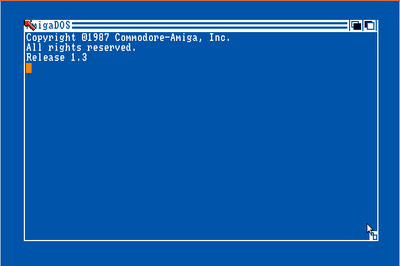
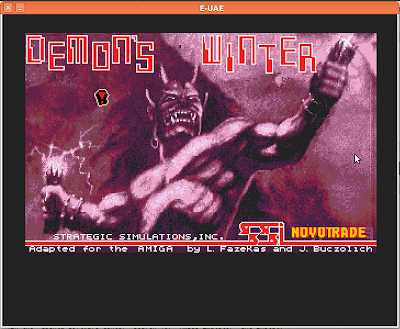
Click start, after a while the Amiga loading screen should should up. Wait for a few seconds and Demon's Winter starts.

Enjoy the game!


Saturday, November 27, 2010

HTML5 Gaming Library Ideas

At Øredev this year and I went to a presentation on Cocos2d for Iphone, "a framework for building 2D games, demos, and other graphical/interactive applications on the Iphone". Since I have been working with HTML5 this gave me an idea that there should be a similar library for HTML5.

This is some of the main features that I think need to be a part of it:

Scene
The Scene object should automaticaly cover the entire canvas/screen.
Holds a list of Nodes
Can hold a list of Layers
An Application can have many Scenes.
- A pause scene
- Main menu scene
- Game scene
It should be possible to have transistions between Scenes

Layers
This is an invisible container for nodes. It can be used to create layered effects such as a background layer and a front layer.

Nodes
Nodes are the objects.
Attributes
-position ( in relation to their parent node, scene or layer )
Should the position be midpoint or left corner. I think both should be possible and can be set depending on what kind of object it is we are working with. E.g. Tile(left corner), Bullet(midpoint)
Methods
-Move To
-Move
-Scale
-Rotate
-RegisterEvent

Sprite
A sprite is a type of node that has an image
Used for images and textures.

Label
A sprite is a type of node that has text
Attributes:
-Text
-Font
-Size
Methods
-Update Text

Prebuilt Nodes Structures
To make it easy for people there should be inbuilt node structures.
E.g.
Menu
-Has menu items

Node Factory
There should be a node factory that creates nodes. Similary to Strophe and Jquery
The factory could be accessed through any other node or scene to create a child node
$scene.cnode(parameters);
$node.cnode(parameters);

Identification
Should use Jquery like identification
I am using the JQuery operator $ in my example but likely it would need to be something else.
$('#apa') - Find object with Id 'apa'
$('node') - All nodes
$('.sprite') - All nodes of class sprite (and it should be possible to create your own classes.

Sequence of Actions
Like JQuery and Strophe objects (nodes,scenes,layers) should return them self if nothing else is returned. This makes it possible to to sequences.
$('#apa').rotate(5).scale(-1).move(150)
$(this).cnode(parameters).move(150).up().scale(160)

Schedule
There should be schedule methods to do time based gaming.

Physics
Could be joined with BOX2DJS for 2d physics

Director
Should be a director that controls the flow of things.

Sound
Background Music
Effects

Particle System
It would be coold to have particle system to create fire and stuff like that.

Tuesday, November 16, 2010

QTP: Connecting to SQL Database

This post describes how you can connect to a SQL Database, execute an SQL statement and loop through the results from QTP using vbscript. The process is pretty straight forward, the main issue is getting the correct connection string for your database.

In the example I am connecting to Access database Northwind. But it should be the same code for connecting to any database, just a different connection string. In my current project we are using this to connect to a IBM DB2 database and it works great.

Option Explicit

Dim connectionString, sql, cn, cmd, rs

' Connection String required to connect to MS Access database
connectionString = "Provider=Microsoft.Jet.OLEDB.4.0;Data Source=C:\Program Files\Microsoft Office\Office10\Samples\Northwind.mdb;"
' SQL statement to run
sql = "select EmployeeID,LastName from employees"

' Create ADO Connection/Command objects
set cn = createobject("ADODB.Connection")
set cmd = createobject("ADODB.Command")

' Open connection
cn.open connectionString
' Associate connection object with command object
cmd.ActiveConnection = cn
' Set the SQL statement of the command object
cmd.CommandText = sql

' Execute query
set rs = cmd.execute

' Enumerate each row in the result set
while rs.EOF <> true and rs.BOF <> True
' Using ordinal
msgbox "Employee ID: " & rs(0)
' Using name
msgbox "Last Name:" & rs("LastName")

rs.movenext
wend

' Close Connection
cn.Close